Why Do You Need a Mini UPS for Your WiFi Router?
A WiFi router may look small, but it controls an important part of modern communication. During a power outage, the internet connection can disappear within seconds. A dark router also stops security cameras, smart devices, and work systems from communicating. This is where a Mini Ups For Wifi Router becomes useful. It can keep compatible networking equipment powered during brief outages, voltage interruptions, or accidental cable disconnections. That small backup can prevent dropped meetings and interrupted online tasks.
Reliable selection requires more than checking the battery size. The Mini Ups For Wifi Router must match the router’s voltage, current, connector, and polarity. These details should come from the router adapter or manufacturer’s manual. A higher capacity does not guarantee longer service if the output is unsuitable. In practical testing, runtime also depends on the router, modem, fiber terminal, and connected devices. One unit may support a router for several hours, while another may last only a short period.
The benefit is practical, not magical. A mini UPS cannot restore an internet provider’s failed network, and it cannot replace a household backup system. It may also need battery replacement after repeated charging cycles. Still, keeping the router online can make a noticeable difference. Imagine a storm outside, a blinking modem, and a video call that remains connected. That moment explains its value. However, choosing only by price is a mistake I would reconsider. Compatibility, battery quality, ventilation, and real runtime matter more than attractive packaging.
What Is a Mini UPS for a WiFi Router?
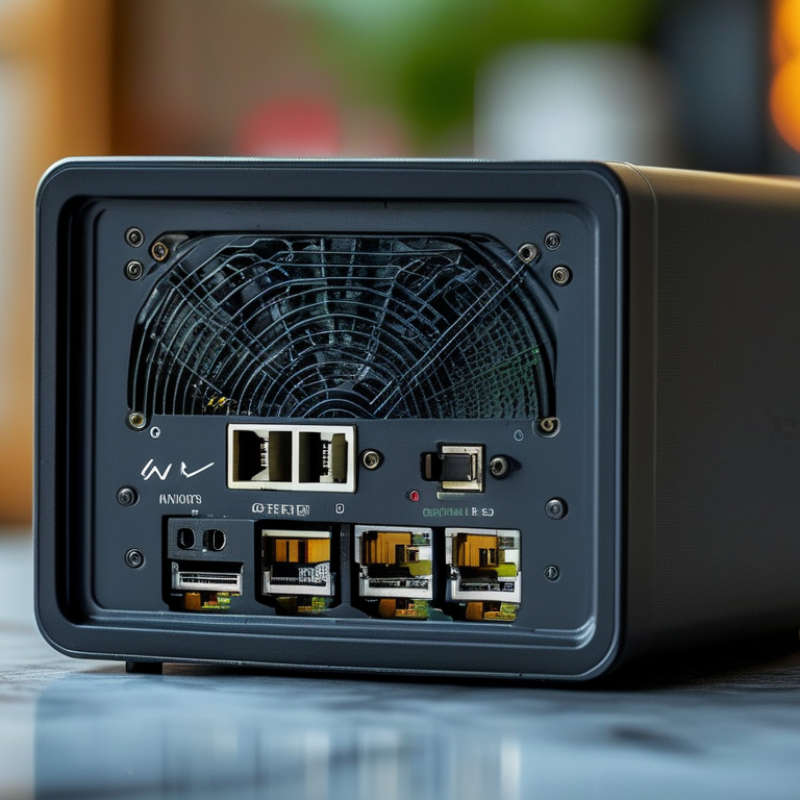
A mini UPS for a WiFi router is a compact battery backup designed to keep your network equipment running during a power interruption. It usually connects between the wall adapter and the router, supplying steady DC power when electricity fails. Some models also support a modem, fiber terminal, or network switch. Unlike a large household UPS, it is smaller, quieter, and made for low-power devices.
In practical use, the mini UPS can prevent dropped video calls, interrupted online classes, and smart-home disconnections. Its runtime depends on battery capacity, router power consumption, and the number of connected devices. Check the router’s voltage, current, and connector before buying. A mismatch can cause unstable service or equipment damage. I once assumed every router used the same power standard. That was careless. The labels should be checked first.
Tips: Place the mini UPS in a cool, dry, ventilated area. Keep its cables away from sharp bends and heavy foot traffic. Test the backup every few months by briefly unplugging the wall adapter. Observe whether the router stays online. Also, avoid expecting long operation from a tiny battery. A basic unit may last only a few hours, and real performance can decline as the battery ages. Keep the firmware and network settings documented, because power protection cannot fix a poorly configured connection.
How Does a Mini UPS Keep Your Internet Connected?
Why Do You Need a Mini UPS for Your WiFi Router?
How Does a Mini UPS Keep Your Internet Connected?
A mini UPS keeps your internet equipment powered when household electricity fails. It stores energy in a rechargeable battery. During an outage, it automatically supplies steady DC power to the router and modem. The changeover happens quickly, often without a visible connection drop. That gap matters.
The U.S. Energy Information Administration reported that American electricity customers experienced an average of 5.5 hours of interruptions in 2022, including major events. A short outage can still interrupt video calls, remote work, security alerts, or online classes. A mini UPS may provide several hours of backup, depending on battery capacity and equipment load. It cannot restore a damaged fiber line. It only protects powered devices.
In practice, connect the modem, router, and fiber terminal carefully. Some homes need power for all three devices. A router alone may show WiFi, but no internet access.
The Uptime Institute’s 2024 Annual Outage Analysis found that 54% of reported outages caused losses above $100,000.
That figure concerns organizations, yet it shows how costly interruptions can become.
Not magic.
Battery life decreases with age and heat. I would test the backup every few months. Check whether the router stays online after unplugging the wall adapter.
My first assumption was that any UPS would work. It was wrong; voltage, connector size, and wattage must match.
Why Is Backup Power Important for WiFi Routers?
Why Do You Need a Mini UPS for Your WiFi Router?
Why Is Backup Power Important for WiFi Routers?
A WiFi router can stop working within seconds of a power cut. The lights may disappear, calls may drop, and smart devices may disconnect. I once assumed that a short outage was harmless. That assumption was incomplete. A mini UPS supplies temporary DC power to the router, helping it stay online during brief interruptions. Your internet service may still fail if the provider loses power. This distinction matters.
Backup power also prevents repeated router restarts when electricity becomes unstable. That can be useful during remote meetings, online classes, home monitoring, or urgent file transfers. In daily use, keeping the router powered is often more convenient than waiting several minutes for it to reboot. However, battery runtime depends on the router’s power demand and the UPS capacity. A small unit may provide limited time. I have found that real conditions can differ from package estimates, especially with older batteries.
Tips: Check the router’s voltage, polarity, connector, and power rating before connecting a mini UPS. If your setup includes a separate modem or optical network terminal, it may need backup power too. Test the system during a planned outage, and inspect the battery periodically. A quiet test can reveal an unsuitable cable or a shorter runtime than expected.
What Features Should You Check Before Buying One?
A mini UPS can keep your WiFi router running during brief power cuts. The right model, however, depends on more than its size. Check the router’s voltage, current, and connector before buying. A mismatch may cause unstable service or equipment damage. The UPS should provide the same voltage and equal or higher current than your router requires.
Battery capacity affects runtime, but advertised figures can be optimistic. A practical model should state its expected backup time under a specific load. For many homes, ten to thirty minutes is enough to preserve a video call or complete an online payment. Check the switchover time too. Fast switching helps prevent router reboots when power fails. Some units also offer USB outputs, which can support a small optical network terminal or security device.
Safety features deserve close attention. Look for overload protection, short-circuit protection, temperature control, and battery charging safeguards. Clear indicators are useful when the lights go out. You should know whether the battery is charging, running, or nearly empty. Size and noise matter as well, especially beside a bed or on a crowded desk. I once focused too heavily on runtime and overlooked connector compatibility. That was a preventable mistake. Also check battery replacement guidance, warranty terms, and recognized electrical certifications. Cheap specifications can hide unclear testing.
Why Do You Need a Mini UPS for Your WiFi Router?
A mini UPS keeps your router and network connection running during short power interruptions. The chart below estimates backup time for a typical 12 V, 2.2 Ah battery system with 85% usable conversion efficiency.
Features to Check Before Buying
Check the output voltage and connector size, maximum output power, battery capacity, charging time, automatic switchover performance, protection against overcharge and short circuits, and compatibility with both your router and modem. Actual runtime varies with battery age, conversion losses, and device load.
Estimated runtime values use: usable energy = 12 V × 2.2 Ah × 85% = 22.44 Wh.
How Can You Install and Maintain a Mini UPS?
Why Do You Need a Mini UPS for Your WiFi Router?
How Can You Install and Maintain a Mini UPS?
Before connecting anything, read the UPS label and your router’s power requirements. Match the output voltage, connector size, and polarity exactly. An incorrect match can damage equipment, even when the plug fits. Place the UPS on a dry, stable surface with open air around it. Keep it away from heaters, curtains, and crowded cable bundles. Connect the UPS to mains power, then charge it fully. Plug the router and modem into the battery-backed outlets. Do not overload the unit with printers, lamps, or other high-draw devices. Keep airflow clear.
Test the setup during a calm period, not during an urgent outage. Unplug the UPS from the wall and check whether the router remains online. Watch the indicator lights and listen for unusual buzzing or heat. Record the runtime with your actual network load. Estimates can mislead. Maintenance is simple but easy to neglect. Inspect the cable, casing, and vents every few months. Remove dust with a dry cloth, and never open the sealed battery compartment. Recharge the unit after a long outage. Replace the battery when runtime drops sharply, swelling appears, or charging becomes unreliable. Use the specified battery type and follow local disposal rules.
I once treated a UPS as a fit-and-forget device. That was a mistake. A loose connector caused intermittent reboots, which looked like an internet fault. Secure every connection, label each cable, and test again after moving furniture. If the router still restarts, measure its adapter output before blaming the UPS. A qualified technician should inspect persistent heat, odor, leakage, or electrical damage. Small checks matter.